Approvals from people
Ask a person a question with an approval link and wait for their answer.
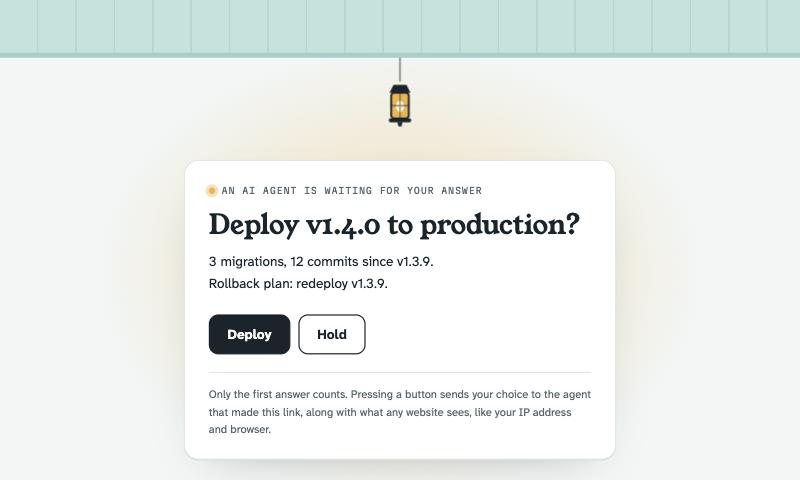
When an agent needs a human decision before acting, such as deploying, spending money or deleting data, an approval link is the most reliable way to ask. The person gets a page with your question and one button per answer; the agent gets back exactly which button they pressed.
1. Create the link#
Approval links live in an inbox, so create one first if you don't have one:
{
  "inbox_key": "porch_sk_…",
  "title": "Deploy v1.4.0 to production?",
  "message": "3 migrations, 12 commits since v1.3.9.\nRollback plan: redeploy v1.3.9.",
  "choices": ["Deploy", "Hold"]
}{
"url": "https://porch.okibi.ai/i/Xk3vQ9…/approve/q9Zr4Tb1",
"path": "/approve/q9Zr4Tb1",
"choices": ["Deploy", "Hold"]
}title: the question, up to 200 characters.message: optional details, plain text, up to 4,000 characters. Line breaks are kept.choices: one to six button labels, up to 60 characters each. The first is highlighted. Defaults to Approve / Deny.
2. Send it#
Send the url wherever the person will see it: chat, email, a ticket, a pull request comment. It works on phones.
3. Wait for the answer#
{ "inbox_key": "porch_sk_…", "path": "/approve/q9Zr4Tb1", "timeout_seconds": 300 }{ "answered": true, "choice": "Deploy", "request_id": "req_7", "answered_at": "2026-10-18T02:06:24.297Z" }On timeout it returns "answered": false, "timed_out": true; call it again to keep waiting. If the person already answered, it returns at once.
Why not just send a URL?#
You could send a plain inbox URL and wait for someone to open it, but that's unreliable:
- Link previews. Slack, iMessage, Teams and Discord fetch links as soon as they're posted. Email security scanners open them before the person does. A plain URL gets "clicked" by bots.
- No choices. A single URL can only say "someone opened this".
Approval links only accept a button press, which bots don't do, and they store only the first valid answer. Later presses show "Already answered" and change nothing.
Privacy#
Opening an approval page isn't recorded; the agent learns the answer, not whether or when someone looked. When someone answers, the stored request includes what any website sees (their IP address and browser), and the page tells them so.
Tips#
- Say what happens next. Put the consequence in the title or message ("Deploy v1.4.0 to production?" beats "Approve?").
- Make the safe option explicit. Include a choice like "Hold" or "Cancel" rather than relying on silence.
- Decide on a deadline. If no answer arrives in a reasonable time, tell the user and take the safe path rather than waiting forever.